
Flying Car Simulator Unblocked — Play Free Online
More Driving games


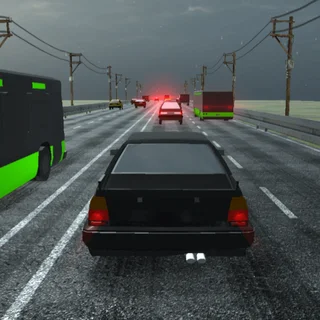








Flying Car Simulator unblocked: play Flying Car Simulator online free right here in your browser — no download, no sign-up, works on a school Chromebook.
Flying Car Simulator is a 3D driving and flight simulation developed by Blue Axis and released in June 2019. You pilot a versatile hybrid automobile that cruises through metropolitan avenues like a road machine and extends aerodynamic wings at will to navigate open airspace. Unlike standard street racing titles that confine vehicular movement to asphalt lanes, this title allows motorists to ascend past skyscrapers, execute midair rolls, and transition back to highway asphalt directly inside a modern web browser with no download required.
Key features
- Dual-mode mobility: Cruise through multi-lane city streets or deploy wings to fly freely through open airspace above skyscrapers.
- Nitro acceleration: Tap the Shift key to trigger high-velocity thrust for clearing rooftops and steep launches.
- Stunt ramp layout: Launch off road ramps placed throughout the urban grid to initiate aerial glides from high elevation.
- Responsive handling: Steer with WASD or arrow keys with instantaneous physics feedback across asphalt and sky.
- Emergency braking: Use the spacebar handbrake to initiate sharp drifts around corners or arrest forward momentum on landings.
- Instant browser access: Load and run the simulation directly in modern desktop or mobile browsers without setup delay.
How to play
- Accelerate along the primary city roadway using WASD or arrow keys to build forward momentum.
- Align your heading toward an incline ramp or an unobstructed stretch of street before taking flight.
- Press the F key to extend your wings and convert your forward vehicle speed into aerial lift.
- Maintain steady altitude while banking around tall urban structures and high-rise office towers.
- Hold the Shift key when extra velocity is required to clear tall architecture or bridge crossings.
- Press the F key once more to fold your wings and descend smoothly back onto the road surface before braking with the spacebar.
Controls
| Action | Keyboard / mouse | Touch |
|---|---|---|
| Steer and accelerate / reverse | WASD or arrow keys | On-screen steering buttons |
| Deploy wings or land | F key | Flight toggle button |
| Nitro boost | Shift key | Nitro pedal |
| Handbrake and drift | Spacebar | Brake button |
Flight mechanics and boost management
Success in Flying Car Simulator requires understanding the physical transition between road traction and aerodynamic lift. While traveling on ground asphalt, your vehicle handles like a sports cruiser with direct steering and responsive acceleration. Once you press the F key, mechanical wings extend from the vehicle chassis, transforming tire-driven propulsion into aerodynamic glide physics. Speed accumulated on the ground determines initial climb rate; attempting to ascend without sufficient road velocity will cause the nose to dip until forward momentum recovers.
Managing your nitro reserves is essential when navigating tight city canyons. Tapping the Shift key delivers immediate rocket propulsion, allowing you to recover altitude quickly or launch across wide rooftop gaps. Because airborne momentum bleeds rapidly during steep upward climbs, reserve your nitro bursts for ascending maneuvers rather than flat horizontal cruising. When approaching a landing strip on a highway or rooftop, retract wings using the F key and engage the spacebar to bleed speed and prevent overshooting the target area.
| Maneuver | Input combination | Tactical purpose |
|---|---|---|
| Highway cruise | WASD or arrow keys | Build maximum velocity along ground avenues |
| Aerial launch | Ramp approach plus F key | Convert road speed into upward flight trajectory |
| Altitude climb | Shift key during ascent | Gain elevation over high-rise buildings rapidly |
| Touchdown stop | F key plus spacebar | Retract wings and arrest ground roll smoothly |
Tips and strategy
- Build ground speed prior to takeoff: Reaching top speed on long straightaways ensures sufficient lift when wings deploy, preventing accidental stalling near street obstacles.
- Save nitro for vertical climbs: Horizontal gliding consumes minimal energy, so conserve the Shift key boost for clearing sudden building ledges and recovering lost altitude.
- Survey landing corridors early: Modern city layouts contain streetlamps and highway dividers; pick wide avenues before toggling flight mode off.
- Feather the handbrake during turns: Tapping the spacebar briefly initiates smooth drifting around tight street corners without shedding excessive road speed.
- Level your chassis before touchdown: Retracting wings while tilted sideways risks rolling the automobile upon pavement contact, so align the vehicle flat before landing.
Similar games on OvO Game
While Flying Car Simulator delivers open-ended three-dimensional vehicle exploration, other titles on the platform explore distinct movement styles:
- OvO: A precision parkour platformer focusing on human momentum, wall jumps, and rapid floor slides rather than automotive cruising.
- Level Devil: A tricky obstacle trial where unexpected traps and shifting floors test puzzle reflexes rather than high-speed flight mechanics.
- Dreadhead Parkour: A side-scrolling acrobatics runner emphasizing timed flips, slides, and hazard avoidance on foot.
Developer and history
Flying Car Simulator was developed by Blue Axis and released in June 2019. Built with 3D web graphics, the title provides fluid hybrid driving and flight mechanics directly within standard web browsers without requiring third-party plugins or standalone installations.
Questions about Flying Car Simulator
Is Flying Car Simulator unblocked at school?
Flying Car Simulator runs in an ordinary browser tab from ovogame.me, with nothing to download or install, so it plays on most school Chromebooks and work computers. If a network filter blocks the site, only that network's administrator can change it.
How do you switch between driving and flying mode?
Press the F key while moving to deploy flight wings and take off into the air, then tap F again whenever you want to touch down on asphalt roads.
What controls are used for acceleration and steering?
Use WASD or the arrow keys to steer, accelerate, and reverse your vehicle across city avenues or maneuver through midair turns.
How does the nitro boost function during flight?
Holding down the Shift key fires your nitro system, giving you rapid bursts of forward propulsion to climb over tall buildings or gain altitude.
Can Flying Car Simulator be played on mobile devices?
Yes, the title runs directly inside modern mobile web browsers with on-screen pedals and touch controls mapped for steering and braking.
More games
 Big Neon Tower vs Tiny Square
 Dreadhead Parkour
 Stickman Parkour 3
 G-Switch
 G-Switch 2
 Stickman Hook
 Dino Run
 Obby Tag
 Rainbow Obby
 Blumgi Rocket
 Crossy Road
 House Of Hazards
 Skiing Fred
 Running Fred
 Temple of Boom
 Basketball Legends
 Basketball Shooter
 Minicars Soccer
 Soccer Skills World Cup
 Rooftop Snipers 2
 Skibidi Shooter
 Paint Strike
 Stickman War
 Monkey Mart
 World's Hardest Game
 Bloxorz
 Elastic Man